Color
The Color data type in GLDrawer is a simple stucture containing four ints for the R, G, B, and A values. In computer graphics, all colors can be expressed with different combinations of red, green, and blue values between 0 and 255 for 8 bit color. The A, or Alpha value is the Transparency of the Color.
In GLDrawer, there is also a special color if you choose Color.Rainbow

Aren’t you glad you decided to read the docs?
Dealing with System.Drawing.Color conflicts
GDIDrawer uses System.Drawing.Color whereas GLDrawer has its own color type. For the most part this doesn’t matter because there’s little reason to include the System.Drawing namespace in a project using GLDrawer.
Unfortunately, when you create a Windows Forms application, System.Drawing gets added by default. This can create issues when creating a color, because the C# compiler doesn’t know which Color data type to use since they are both called “color”. What the “using” keyword does is tell the compiler not to worry about specifying which namespace your accessing when you use its classes
Fortunately GLDrawer.color can be implicitly converted between System.Drawing.Color. So for most cases, you can just uninclude the System.Drawing namespace from you document and use GLDrawer.Color exclusively. Since it can be converted, you can still use colors eg. setting the back color of a control with a GLDrawer Color.
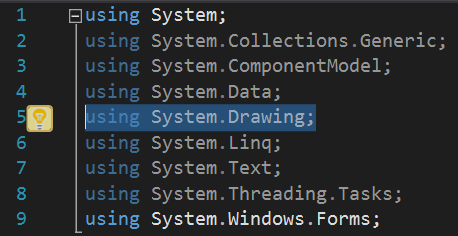
Delete this line of code
If for any reason you do need both color structures, you can have two options. One option is to not using the System.Drawing namespace, but specify your namespace every time you create a System.Drawing color. The other option would be to include System.Drawing and specify which namespace you’re using for every color, although this will likely be more work.
//specifying the use of a GlDrawer color
GLDrawer.Color A = new GLDrawer.Color.Blue;

//specifying the use of a System.Drawing color
System.Drawing.Color B = new System.Drawing.Color.Red;

//Colors are still implicitly convertible, so you don't always need to specify
A = B;