Creating Input Events
Creating an input event with GLDrawer is simple. All you need to do is create a special function to handle your input. After that, you just need to tell GLDrawer to use it.
The fast and easy way
Simply type the name of your canvas, followed by a dot, and use the arrow keys to find the event you’re looking for. Then, type “+=” and hit tab. An appropriate function will be automatically generated by intellisense with the parameters you need. There’s nothing else you need to set up. Any time the particular input occurs, your new function will be called.
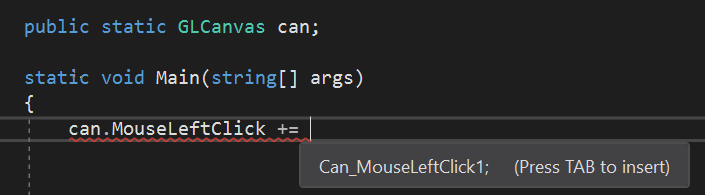
If the shortcut doesn’t work for you, or you’d like to understand how to set up the event yourself, keep reading for more info.
Step 1
Read these docs or use intellisense to find the delegate format your need to use. There are only three.
| Name | Parameters |
|---|---|
| GLMouseEvent | (vec2 Position, GLCanvas Canvas) |
| GLKeyEvent | (Keys Code, GLCanvas Canvas) |
| GLScrollEvent | (int Delta, GLCanvas Canvas) |
Step 2
Once you know the parameters you need, create a static function that takes those parameters. For this example we will create a function to handle a left mouse click which takes a vec2 and a GLCanvas reference. Your function must be a void function that takes only these parameters or you will get an error.
private static void Can_MouseLeftClick(vec2 Position, GLCanvas Canvas)
{
}
Step 3
We need to tell the canvas about our input function. Somewhere near the start of your program (after initializing the canvas) use “+=” to subscribe your function to the MouseLeftClick event of your canvas.
can.MouseLeftClick += Can_MouseLeftClick;
Step 4
Your function should now be subscribed and will be called every time the canvas is left clicked. Lets test our work by adding an ellipse to the canvas wherever we click!
private static void Can_MouseLeftClick(vec2 Position, GLCanvas Canvas)
{
    Canvas.AddCenteredEllipse(Position.x, Position.y, 50, 50, Color.White);
}
If you’re still having issues, Make sure your function is a static void. Double check that the function has the required parameters and that the line of code that subscribes the function actually runs.